
Spiro Art ASMR
Rollic GamesSimulation
4.0599.00 Reviews
- Version
- 3.0.9
- Installs
- 1.00M
- Age Rating
- Everyone
Screenshots
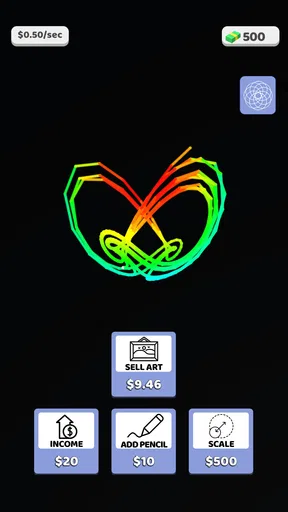
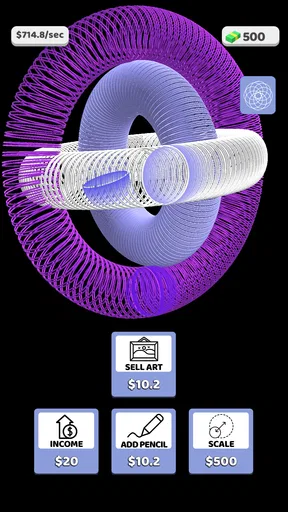
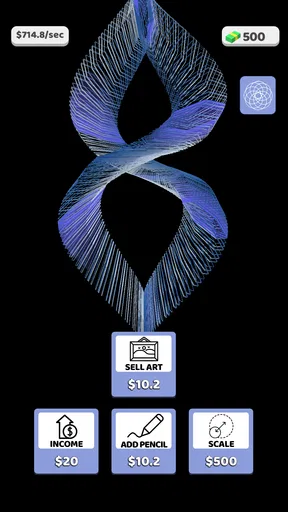
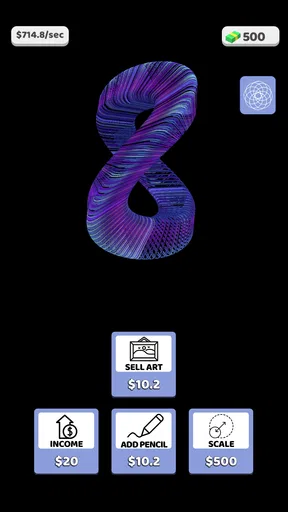
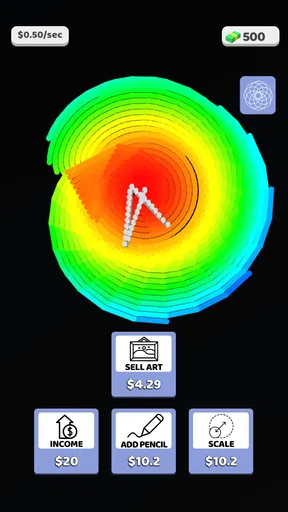
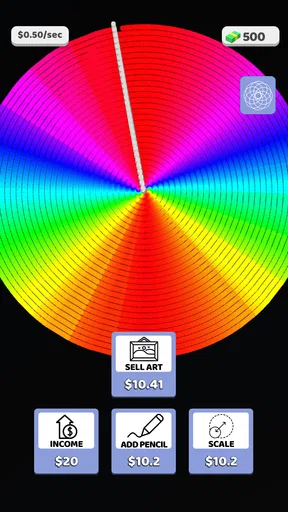
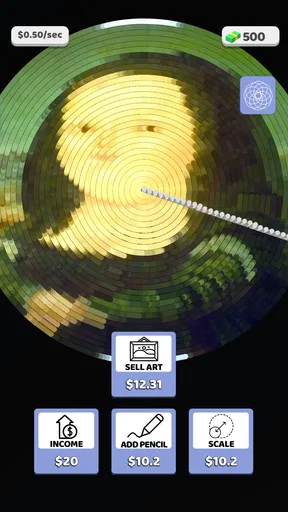
Our Review of Spiro Art ASMR
 Analysis by Appyee
I went into Spi ro Art ASMR expecting a simple drawing toy, and that is exactly what it is—though the appeal becomes clearer after a few minutes of play. This is a colorful simulation game from Rollic Games built around creating spiral-style artwork through repeated, controlled actions. It is free to download, rated for Everyone, and its short store description, “Spiro Art ASMR,” gives a fair idea of the mood: calm, visual, and designed for short sessions rather than a demanding challenge.
The first thing I noticed is how quickly the game gets to its main activity. There is no complicated setup to learn before making something. I can begin, interact with the drawing process, watch the pattern develop, and decide whether the result is satisfying enough to keep looking at or whether I want to start over. That immediate path from touch to visible artwork is the strongest part of the experience.
It currently sits at a 4.0 average from around 5,000 ratings, with more than a million installs. Those figures suggest that the straightforward idea has found an audience, but they also fit my impression of the game: it is easy to understand and pleasant in small doses, while players looking for deep simulation systems or a long-term challenge may eventually want more.
From the first touch to the first finished pattern
The core action is best understood as a small creative routine. I begin by interacting with the on-screen art process, guide the movement as the design takes shape, and wait for the visual result to become complete. The important detail is that the game makes the transformation visible. I am not simply tapping through menus to receive a finished picture; I get to see the pattern emerge from the action.
That makes the opening moments more rewarding than a conventional coloring game. In a coloring app, the main decision is usually which area to fill and which color to choose. Here, the interest comes from watching lines build into a recognizable spiral composition. The artwork feels connected to what I have just done, even though the experience remains highly guided and uncomplicated.
I would recommend starting with a light touch and paying attention to the movement rather than rushing to finish. The game is more enjoyable when I treat the first few seconds as the activity itself, not merely as a delay before the reward. The changing image provides enough feedback to tell me whether the current action is progressing, and that visual response is what gives the game its relaxing character.
There is also a useful distinction between playing for completion and playing for the sensation of completion. If I only care about reaching the final picture, the loop can feel brief. If I enjoy the gradual build-up—the repeated motion, the growing color, and the moment when the design looks finished—the same interaction has a softer, more satisfying rhythm.
Why the action feels more like drawing than solving
Although this is categorized as a simulation game, I would not approach it like a traditional management or physics simulator. It does not ask me to balance resources, plan a complicated system, or learn a demanding set of rules. Its simulation quality is closer to reproducing the feeling of making decorative art: I initiate the process, observe the pattern, and enjoy the result.
That focus makes it accessible to people who are not usually interested in games. Someone who wants a quiet activity during a short break can understand the main interaction almost immediately. A younger player can also follow the visual cause and effect without needing a long tutorial. The Everyone content rating matches that approachable presentation.
The trade-off is that simplicity leaves little room for mastery in the usual gaming sense. I am not improving a complex technique through repeated practice, and the game does not become a serious art tool simply because it produces attractive designs. It is better viewed as a guided creative toy with a soothing feedback cycle.
The feedback rhythm: action, color, and visual confirmation
The most important part of the experience is the rhythm between what I do and what appears on screen. I make an input, the artwork changes, and the change confirms that the input mattered. That short delay between action and visible progress is enough to keep the process engaging without making it stressful.
This rhythm is why the game works well when I want something undemanding. There is no need to remember a complicated objective while the pattern develops. My attention can stay on the colors and movement. The result is more focused than simply watching a video, but less demanding than a puzzle game that expects constant decisions.
I found that the visual response matters more than the final picture. The completed design is the reward, but the changing image is what carries the session. If the feedback were hidden until the end, the interaction would feel like a chore. Because the pattern grows in front of me, each small step has a reason to continue.
The practical trick is to judge the game by its rhythm, not by its depth. If I approach it expecting a full drawing suite or a competitive challenge, I will probably be disappointed. If I want a few minutes of guided visual activity, the repeated response is much easier to appreciate.
A good fit for short breaks
A realistic use case is a short pause between tasks. I can open the game when I have enough time for one small activity but do not want to commit to a story, a match, or a long level. The immediate start means I do not have to reconstruct a complicated plan from a previous session. I can interact with the current design, enjoy the completion moment, and put the phone away.
It can also suit someone who likes watching patterns form while listening to music or taking a quiet break. I would still keep expectations reasonable: the game’s appeal comes from its own visual feedback, not from offering a broad creative workspace. If I want to draw freely, select every detail, or save a carefully edited illustration, a dedicated art application is the better choice.
Another useful situation is sharing the phone with a child who wants an activity that is easy to understand. The colorful presentation and simple interaction reduce the need for verbal instructions. I would still supervise device use as I would with any mobile game, but the basic loop is far less intimidating than a game with complex controls or competitive pressure.
The reward: seeing a simple action become artwork
The reward arrives when the spiral design looks complete. It is not a prize in the traditional sense; the satisfaction comes from seeing a finished visual object that has grown from the preceding interaction. That kind of reward is modest, but it is immediate and understandable.
I like that the game does not require me to be artistically skilled to get a colorful result. In a freehand drawing app, an unsteady line can make me feel as if I have failed. Here, the structure of the experience guides the result, so I can concentrate on the process instead of worrying about whether I have produced something technically impressive.
At the same time, that guidance limits personal expression. The finished work feels like something I helped create rather than something I designed from scratch. This is an important difference for anyone choosing between Spiro Art ASMR and a conventional drawing or coloring application. The former offers a polished path to a result; the latter usually gives me more control but also asks more from me.
The game’s colorful presentation is central to that reward. Without the color changes, the spiral action would feel much more mechanical. The palette and gradual build-up give the final image enough visual interest to make completion feel worthwhile, especially during the first sessions.
Where the reward can lose strength
After I understand the pattern, the surprise naturally decreases. The first few completed designs benefit from discovery: I am learning how the action turns into a finished image. Later, the reward depends more on whether I am in the mood for repetition. Players who need new rules, escalating difficulty, or a strong sense of progression may find the loop too familiar.
This is not necessarily a flaw, because the game is clearly aimed at a relaxed form of play. However, it does affect who should install it. I would suggest it to someone seeking visual calm and quick completion, but not to a player who wants a long campaign, strategic choices, or a demanding skill curve.
There is also a difference between a reward that relaxes and one that motivates. The finished pattern can make me feel satisfied for a moment, but it does not automatically create a larger goal. If I need a game to keep me invested through unlocks, competition, or increasingly difficult tasks, I would choose another simulation or puzzle experience.
Resetting the session and deciding whether to continue
The reset is what turns one completed design into another session. Once I have seen the result, the natural question is whether I want to repeat the same kind of activity with a new pattern or stop while the experience still feels fresh. That choice is central to the game’s design because the individual interaction is short and the long-term appeal comes from repeating it.
I appreciate that the loop does not demand a large time commitment. I can finish a small session without feeling that I have abandoned a complicated task. This makes the game easy to fit into a daily routine, especially when I want a distraction that ends cleanly.
The downside is that resetting can expose the limited nature of the experience. In a deeper simulation, a reset might introduce a new strategic situation. Here, the reset mainly offers another chance to enjoy the same basic relationship between movement and visual output. Whether that feels refreshing or repetitive depends almost entirely on how much I enjoy the pattern-making itself.
My advice is to play in short bursts rather than forcing a long sitting. The game works better when I stop after the loop has delivered its small reward and return later if I want another calming activity. Trying to extract a lengthy session from it can make the repetition more noticeable and weaken the relaxing effect.
Free access and the purchase question
The game is free, which makes it easy to try without making a financial commitment at the start. It includes in-app purchases priced at $2.99 per item. For me, that means the sensible approach is to test the basic loop first and decide whether the experience earns a place in my regular rotation before considering any optional spending.
I would not recommend purchasing anything simply because the first few patterns are enjoyable. The key question is whether the repeat session remains satisfying after the novelty has settled. If I only open the game occasionally, the free entry may be enough. If I return often and find the available extras genuinely improve the way I play, an individual purchase may feel more reasonable.
Parents should also be aware that a free download with in-app purchases can change how a child interacts with the game. The Everyone rating speaks to the general content, not to a family’s spending preferences. Checking purchase controls on the device is a sensible step before handing over the phone.
How it compares with drawing, coloring, and other simulation games
Compared with a coloring game, this title asks for less selection and gives me a more automatic visual payoff. I do not need to choose every region or carefully stay inside lines. That makes it more relaxing, but it also means I have less ownership over the final composition.
Compared with a freehand art app, it is much easier to begin and much harder to personalize. A drawing application is better when I want to sketch an idea, edit details, or develop a specific technique. Spiro Art ASMR is better when I want the pleasure of watching a decorative image form without facing a blank canvas.
Compared with deeper simulation games, it has almost no management burden. There is no need to plan a city, operate a business, or maintain a complicated system. That makes it a poor substitute for players who enjoy decisions and consequences, but a strong alternative for anyone who finds those systems tiring.
It also differs from puzzle games because the main goal is not to solve a problem. I am following a visual process rather than searching for the correct answer. If I want a calm activity with no fear of failure, that is a meaningful advantage. If I want to feel clever after overcoming a difficult obstacle, another genre will serve me better.
Device expectations and practical details
The game supports devices running Android 7.0 or later, so it is available to people using older Android hardware as well as newer phones. I would still judge the experience on the actual device rather than assuming that compatibility guarantees identical smoothness everywhere, especially when colorful animations are involved.
The current version is 3.0.9. Keeping the app updated is generally sensible because mobile games can change their presentation or interaction over time, but I would not install it expecting a completely different type of game after an update. Its identity remains tied to the same simple art-making loop.
Because the experience is visual, screen size can affect comfort. On a larger display, the growing spiral is easier to appreciate and the interaction feels less cramped. On a small phone, the game is still convenient for quick breaks, but some of the visual pleasure may be reduced simply because the finished design occupies less space.
My verdict on the complete loop
My overall impression is that Spiro Art ASMR succeeds when I let it be a small, focused experience. The action is immediate, the feedback is clear, the reward is colorful completion, and the reset makes another brief session easy to begin. That loop is coherent from start to finish, and it explains why the game can appeal even to people who do not usually spend time with simulation titles.
The strongest reason to try it is the combination of low pressure and visible progress. I can make something attractive without drawing skill, solve nothing, manage nothing, and still receive a clear sense of completion. For a short break, that can be exactly enough.
The main limitation is equally clear: the same simplicity that makes the game welcoming can make it repetitive. I would skip it if I wanted deep customization, meaningful strategy, a substantial progression system, or a serious digital art workspace. A coloring app would suit someone who wants more control over fills, while a drawing app would be better for original artwork.
For everyone else, I think the free download is worth trying with modest expectations. Give it a few short sessions, notice whether the action-to-color rhythm actually relaxes you, and avoid judging it as though it were a full creative suite. Its best use is as a compact visual reset, not as a game you need to master. With that understanding, Spiro Art ASMR offers a pleasant, accessible way to watch simple interactions turn into colorful spiral art.
Verdict
Strengths of Spiro Art ASMR
- Satisfying spiral drawing mechanics with relaxing ASMR feedback
- Simple controls make it accessible for casual players of all ages
- Creative patterns can be customized with different colors and shapes
- Short sessions work well for quick relaxation breaks
- Offline play is convenient when traveling or without internet
Limitations of Spiro Art ASMR
- Repetitive gameplay may become predictable after extended sessions
- Some content or tools may require watching ads or making purchases
- ASMR sounds can feel distracting rather than relaxing for some players
- Limited challenge may not satisfy users seeking competitive gameplay
- Ads can interrupt the calming experience during or between activities
Other Releases by Rollic Games
View All


Similar Picks in This Category
View All
Truckers of Europe 3
Wanda Software4.3

Town Building Life Simulator
XGame Global4.2

Fidget Toys Trading・Pop It 3D
Freeplay Inc4.7

Sculpt People
CrazyLabs LTD4.4

Scary Teacher 3D
Z & K Games4.2

Hair Tattoo: Barber Shop Game
CASUAL AZUR GAMES4.3
Frequently Asked Questions
What is Spiro Art ASMR, and how does it work?
Spiro Art ASMR is a relaxing creative app centered on making geometric spiral artwork. You typically choose colors, patterns, and drawing settings, then guide or adjust rotating shapes to produce symmetrical designs. The experience combines simple artistic interaction with calming visual effects and, depending on the version, soothing sounds or ASMR-style feedback. It is designed for casual use rather than professional illustration.
Is Spiro Art ASMR suitable for children?
The app is generally easy to understand because its main activity involves creating colorful patterns through simple controls. However, parents should check the current age rating, advertising settings, and in-app purchase information before allowing children to use it. Some versions may include third-party ads or optional purchases. Younger users may also need help understanding menus, permissions, or saving and sharing features.
Does Spiro Art ASMR work offline?
Many of the basic drawing functions may work without a continuous internet connection once the app is installed, which makes it convenient for relaxing during travel or away from Wi-Fi. Nevertheless, internet access may still be required for advertisements, online content, analytics, updates, or sharing artwork. Offline behavior can vary by Android or iOS version, so it is worth testing the main tools before relying on it without connectivity.
Does Spiro Art ASMR contain advertisements or in-app purchases?
The availability of advertisements and purchases depends on the edition and platform listing available on your device. Free versions of creative casual apps commonly include advertising, while optional purchases may remove ads, unlock extra tools, or provide additional visual effects. Before downloading, review the store page carefully and check the purchase controls, especially if the app will be used by children or on a shared device.
Can artwork created in Spiro Art ASMR be saved or shared?
The app is primarily intended for experimenting with colorful spiral designs, and many versions provide a way to save finished creations as images or share them through the device’s standard sharing menu. The exact export options, image quality, and supported destinations may differ between releases. If saving artwork is important to you, confirm that the current version offers the gallery access and sharing functions you expect.
Play our best games!


